How to Remove Background from Animated GIF Files in 3 Steps
Open an animated GIF or try the demo. Click Upload GIF to open your device's local file picker and decode frames in your browser; GIF files, filenames, and pixels are never sent to a server. On a phone or tablet, choose a local GIF through your mobile browser's file picker. Our Privacy Policy explains aggregate site analytics and zero-upload file processing. Or try a built-in demo first.
Choose a removal mode and tune the edge. Use the guide below, select the background, and increase Tolerance gradually. Play the animated GIF to inspect changes. Add Halo Cleanup for light outlines and use Edge Shrink sparingly.
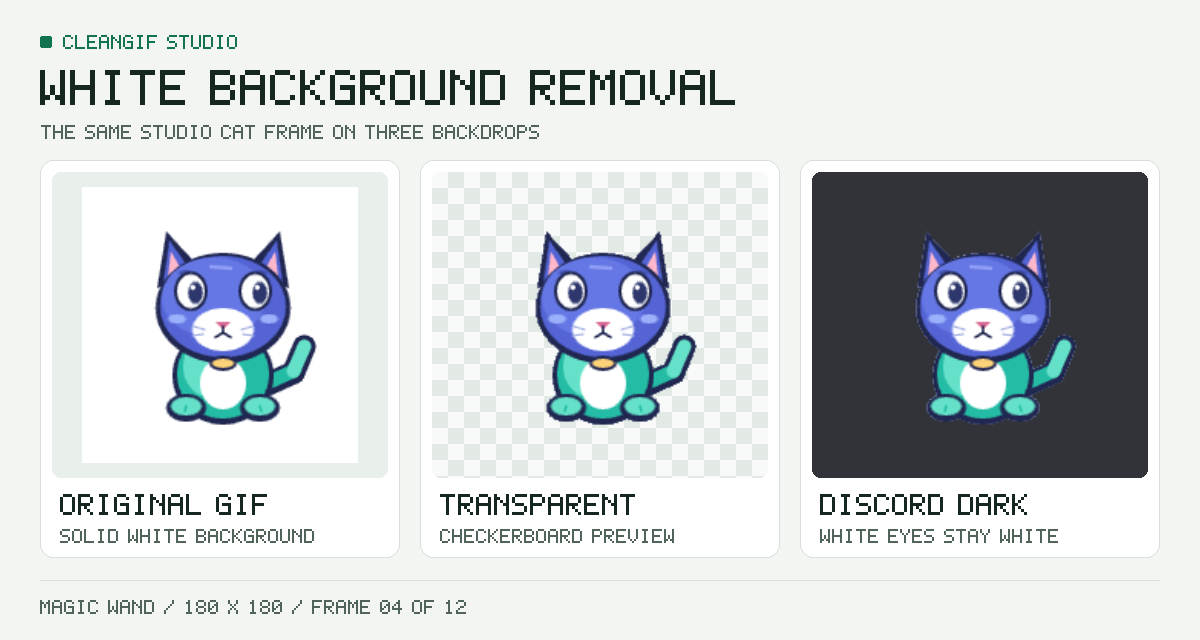
Preview and export. Check the animation on the checkerboard and Discord dark preview (
#313338). Download a transparent animated GIF or save the current frame as a PNG. The GIF background remover preserves source frame delays and loop settings. On a phone or tablet, resize or shorten very large animations if device memory is tight, then save the exported file from your browser downloads.
Which Removal Mode Fits Your GIF Background?
| Background | Recommended choice |
|---|---|
| Solid or white backdrop; subject has white details such as eyes, shirt, or logo | Magic Wand: connected flood-fill from outer edges; add points for inner holes. |
| Uniform single-color backdrop absent from the subject | Color Key: remove up to 6 sampled colors across the whole image. |
| Green or blue screen | Green Screen: chroma cone keying with a Spill suppression toggle. |
| Complex real-world footage, moving shadows, or translucent hair | Color/flood-fill keying can leave artifacts; difficult edges may need manual editing elsewhere. |
CleanGIF uses local connected flood-fill, color key, and chroma keying, which work best for solid and green or blue backdrops. For complex real-world footage, fine hair, or moving shadows, dedicated subject-segmentation tools may work better; results and privacy vary by product.
Compression can introduce neighboring shades, so check the full loop and adjust for the weakest frame. Moving shadows can defeat a single setting.
Supported GIF Specs, Modes, and Honest Limits
| Feature | What CleanGIF does |
|---|---|
| Input | Reads GIF87a and GIF89a frames, including interlaced GIFs. Open one GIF at a time, up to 50 MiB, 2,400 pixels per side, 300 frames, and 384 MiB of decoded RGBA frame data. Device memory may impose a lower practical ceiling. |
| Removal | The GIF background remover offers Magic Wand flood-fill, Color Key, and Green Screen to select a backdrop. |
| Animation | Preserves frame delays and loop settings for animated GIFs: infinite, finite, or non-looping with no loop extension. Single-frame exports omit loop extensions. |
| Frame disposal | Rebuilds disposal methods 1, 2, and 3 and exports with disposal 2 to avoid ghost trails. |
| Privacy and cost | Runs locally in your browser, free, without sign-up or watermarks. |
| Still output | Exports a PNG frame when you need a single image. |
To remove background from animated GIF files with white details, select a mode that protects the subject. For a white-background product or logo GIF, use Magic Wand on the outside backdrop. Add points to enclosed background pockets, such as the center of a letter. Lower Tolerance if it starts removing similar-colored parts of the subject, and inspect the animation before exporting.
Honest scope: Solid backgrounds, cartoons, stickers, and clean studio shots work best; check the full animation and keep the original.
GIF transparency is binary: each pixel is either transparent or opaque. Check edges against the final surface, not only the checkerboard; too much cleanup can erase fine lines.
You can remove background from animated GIF files locally, then test the downloaded animation in the app where it will appear.